 风君子博客
风君子博客why do it
如果你的App中包含或涉及到第三方登录(例如:QQ登陆、微信登陆等),就必须接入苹果登陆,如果不适配苹果推出的Sign In With Apple审核将会被拒绝。
what is Sign In With Apple
其实和平时的一些第三方登陆一样,通过授权,可以拿到用户名,邮箱地址,用户ID等信息,接入 Sign In With Apple 后, 应用程序或网站中显示“ 通过Apple登录”按钮,意味着可以使用他们已有的Apple ID进行点击或登录,而无需填写表格,验证电子邮件地址和选择密码等操作;提供了一种新的,更私密的方式登陆。
接入 Sign In With Apple
一、首先手机必须是iOS 13(包含iOS 13)以上的iOS系统
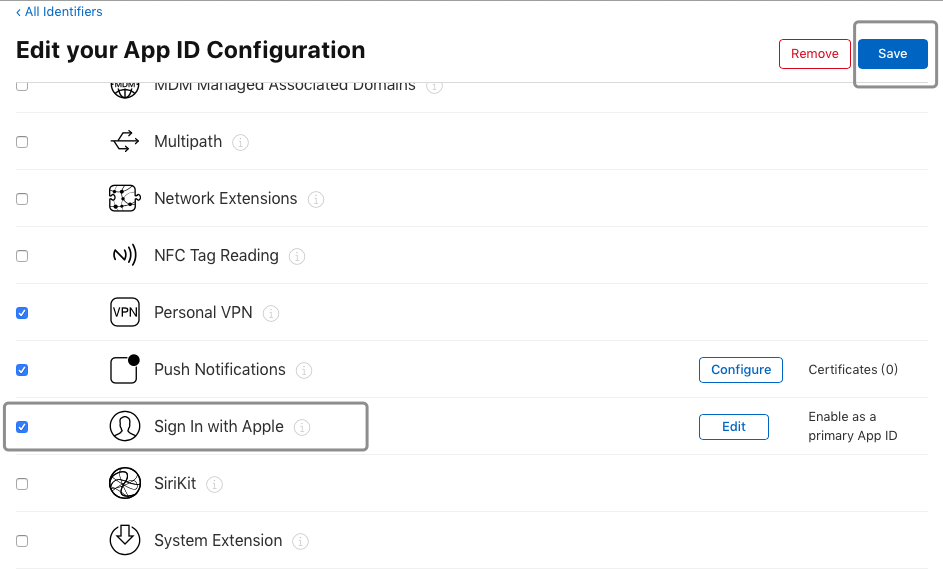
二、项目 Bundle ID(Bundle identifier)勾选 Sign In With Apple 功能,然后保存
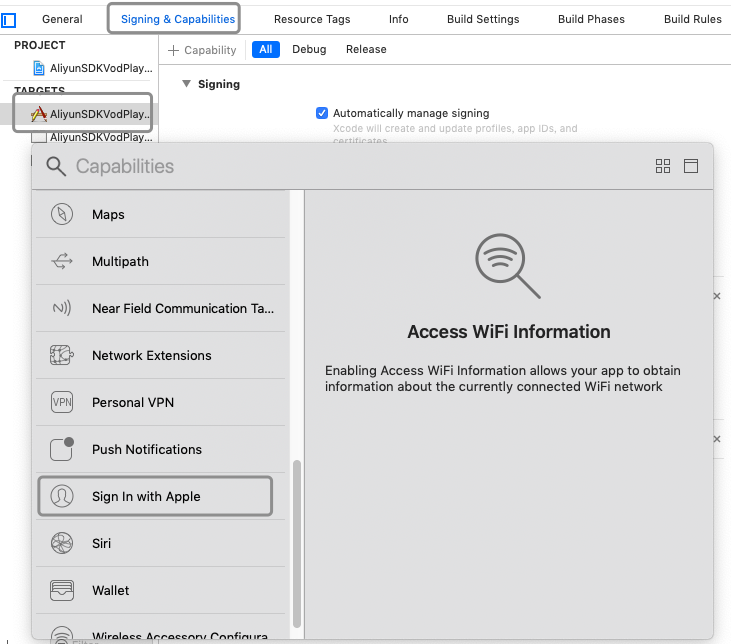
三、Xcode 配置 Singing & Capabilities

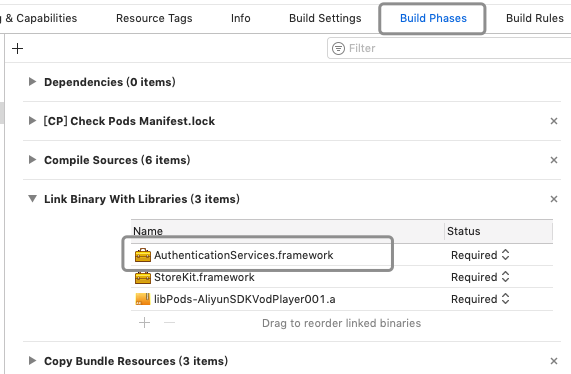
四、添加 AuthenticationServices.framework 库
五、代码集成
引入头文件 #import <AuthenticationServices/AuthenticationServices.h>
添加代理 <ASAuthorizationControllerDelegate, ASAuthorizationControllerPresentationContextProviding>
添加“ 通过Apple登录”按钮 ,必须用系统的按钮样式,在iOS 13中提供了此按钮样式的创建方法,
if (@available(iOS 13.0, *)) {
     ASAuthorizationAppleIDButton *abtn = [ASAuthorizationAppleIDButton
                                           buttonWithType:ASAuthorizationAppleIDButtonTypeSignIn
                                           style:ASAuthorizationAppleIDButtonStyleBlack];
     [abtn addTarget:self action:@selector(signInWithApple) forControlEvents:UIControlEventTouchUpInside];
     //  圆角设置
     //  abtn.cornerRadius = 0;
     abtn.frame = CGRectMake((ScreenWidth - 200)/2, (ScreenHeight - 100)/2, 200, 40);
     [self.view addSubview:abtn];
 }
ASAuthorizationAppleIDButtonType
typedef NS_ENUM(NSInteger, ASAuthorizationAppleIDButtonType) {
    ASAuthorizationAppleIDButtonTypeSignIn,   /// 通过Apple登录
    ASAuthorizationAppleIDButtonTypeContinue, /// 通过Apple继续
    ASAuthorizationAppleIDButtonTypeSignUp ,  /// 通过Apple注册
    ASAuthorizationAppleIDButtonTypeDefault = ASAuthorizationAppleIDButtonTypeSignIn,  /// 通过Apple登录
}
ASAuthorizationAppleIDButtonStyle
typedef NS_ENUM(NSInteger, ASAuthorizationAppleIDButtonStyle) {
    ASAuthorizationAppleIDButtonStyleWhite,        ///白色背景黑色字体样式,无边框
    ASAuthorizationAppleIDButtonStyleWhiteOutline,  ///白色背景黑色字体样式,有黑边框
    ASAuthorizationAppleIDButtonStyleBlack,         ///黑色背景白色字体样式,无边框
}
ASAuthorizationAppleIDButtonStyleWhite(深色背景下使用)

ASAuthorizationAppleIDButtonStyleWhiteOutline(浅色背景下使用)

ASAuthorizationAppleIDButtonStyleBlack(浅色背景下使用)

点击“ 通过Apple登录”按钮执行方法
 if (@available(iOS 13.0, *)) {
     ASAuthorizationAppleIDProvider *provider = [[ASAuthorizationAppleIDProvider alloc] init];
     ASAuthorizationAppleIDRequest *request = [provider createRequest];
     request.requestedScopes = @[ASAuthorizationScopeFullName, ASAuthorizationScopeEmail];
     ASAuthorizationController *vc = [[ASAuthorizationController alloc] initWithAuthorizationRequests:@[request]];
     vc.delegate = self;
     vc.presentationContextProvider = self;
     [vc performRequests];
 }
授权的代理方法
#pragma mark - ASAuthorizationControllerDelegate

- (void)authorizationController:(ASAuthorizationController *)controller didCompleteWithError:(NSError *)error API_AVAILABLE(ios(13.0)) {
    NSString *errorMsg = nil;
    switch (error.code) {
        case ASAuthorizationErrorCanceled:
            errorMsg = @"用户取消了授权请求";
            break;
        case ASAuthorizationErrorFailed:
            errorMsg = @"授权请求失败";
            break;
        case ASAuthorizationErrorInvalidResponse:
            errorMsg = @"授权请求响应无效";
            break;
        case ASAuthorizationErrorNotHandled:
            errorMsg = @"未能处理授权请求";
            break;
        case ASAuthorizationErrorUnknown:
            errorMsg = @"授权请求失败未知原因";
            break;
    }
    NSLog(@"%@", errorMsg);
}

- (void)authorizationController:(ASAuthorizationController *)controller didCompleteWithAuthorization:(ASAuthorization *)authorization API_AVAILABLE(ios(13.0)) {

    if ([authorization.credential isKindOfClass:[ASAuthorizationAppleIDCredential class]]) {
        ASAuthorizationAppleIDCredential *credential = (ASAuthorizationAppleIDCredential *)authorization.credential;
        NSString *state = credential.state;
        NSString *userID = credential.user;
        NSPersonNameComponents *fullName = credential.fullName;
        NSString *email = credential.email;
        NSString *authorizationCode = [[NSString alloc] initWithData:credential.authorizationCode encoding:NSUTF8StringEncoding];
        NSString *identityToken = [[NSString alloc] initWithData:credential.identityToken encoding:NSUTF8StringEncoding];
        ASUserDetectionStatus realUserStatus = credential.realUserStatus;
        NSArray *authorizedScopes = credential.authorizedScopes;

        NSLog(@"state: %@", state);
        NSLog(@"userID: %@", userID);
        NSLog(@"fullName: %@", fullName);
        NSLog(@"email: %@", email);
        NSLog(@"authorizationCode: %@", authorizationCode);
        NSLog(@"identityToken: %@", identityToken);
        NSLog(@"realUserStatus: %@", @(realUserStatus));
        NSLog(@"authorizedScopes: %@", authorizedScopes);
    }
}

#pragma mark - ASAuthorizationControllerPresentationContextProviding
- (ASPresentationAnchor)presentationAnchorForAuthorizationController:(ASAuthorizationController *)controller API_AVAILABLE(ios(13.0)) {
    return [UIApplication sharedApplication].keyWindow;
}
- (NSString *)documentPath{
    NSString *documentPath = [NSSearchPathForDirectoriesInDomains(NSDocumentDirectory, NSUserDomainMask, YES) lastObject];
    return documentPath;
}
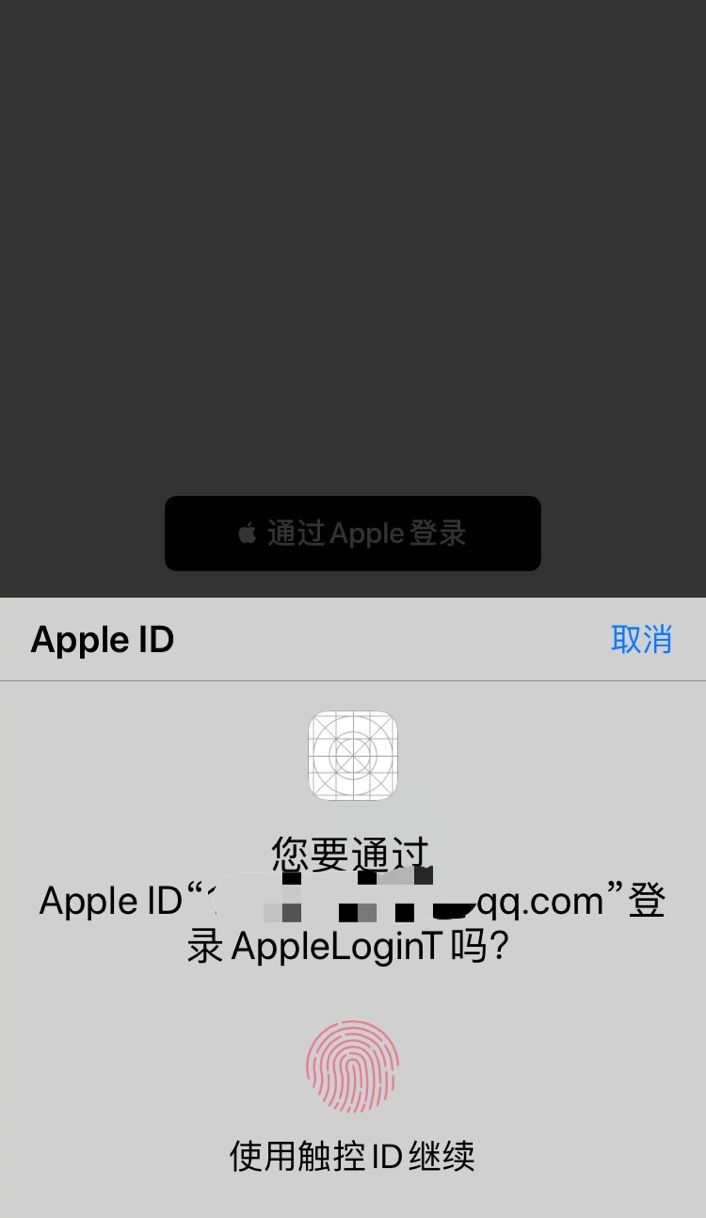
运行效果
发表回复